Feet and inches area calculator for Excel
Enter each room’s length and width in feet and inches. The calculator converts them and shows the area in square feet and square metres, room by room and for the whole house.
49,000+ downloads · free · no email needed
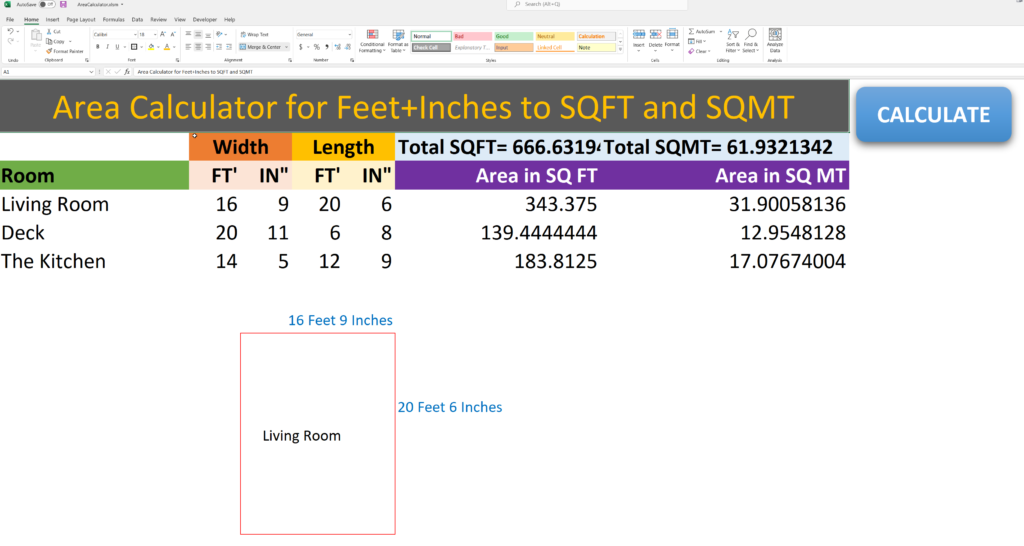
How the calculator works
- Enter the length and width of each room. Use feet only, inches only, or both.
- The area of each room appears straight away in square feet and square metres.
- The total area of the house or building is added up for you.
How to calculate square footage by hand
- Measure the length and width of the room.
- Turn inches into feet: divide by 12 and add to the feet. 6 inches is 0.5 ft, 3 inches is 0.25 ft.
- Multiply length by width. 12.5 ft × 10.25 ft = 128.13 sq ft.
- For square metres, multiply square feet by 0.0929. 128.13 sq ft ≈ 11.9 m².
- For an L-shaped room, split it into rectangles, work out each one and add them up.
Watch: how to calculate square footage
Planning a renovation or build?
Square footage is usually the first number in a building budget. Once you know it, schedule the work with a construction Gantt chart template and keep the costs in a project budget planner.
Free Excel area calculator for Windows and Mac.
DownloadFrequently asked questions
How do I calculate square footage from feet and inches?
Convert each measurement to feet first: divide the inches by 12 and add them to the feet. A room 12 ft 6 in by 10 ft 3 in is 12.5 × 10.25 = 128.13 square feet. The calculator does this conversion for every room automatically.
Can I enter only inches?
Yes. Enter only feet, only inches, or both, in either the length or the width.
Does it give square metres too?
Yes. Every room and the total are shown in square feet and square metres.
Is it free?
Yes. Download it directly, no email needed.
It would be nice if could have shown with working of formulas used in your sheet
Manuel, we will add the formulas to be visible in our next version.
Doesn’t show calculations and the downlowd doesn’t work without the macro.
@Burton, the file is a macro enabled file that runs the automation and calculations. In our next version we will also show the formulas that show the calculations.
Do you have a formula table for linear feet also? This is great! Thank you
Liz thank you. We will work on it if we get more requests.
Thank you very much but I need to know how to apply formula so can I get the information from you please
Your spreadsheet looks perfect for what I need it for. It looks like you were going to add the formulas (2 years ago) Did this ever happen? My spreadsheet is only calculating the first 5 lines.